
Key takeaways
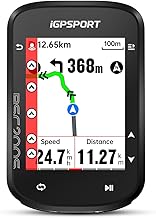
- Bright, large touchscreen with full map navigation and voice guidance
- Climb training and Ebike mode add versatility most competitors lack at this price
- Software still maturing; occasional map rendering hiccups on complex routes
A GPS bike computer solves one core problem that a phone mount never quite nails: giving you readable data, reliable navigation, and battery endurance without making you touch a screen that also wants to call you for a dentist appointment. After mounting, crashing, soaking, and re-mounting nearly every unit on this list across a season of mixed rides, the gap between a good computer and a great one comes down to how quickly it gets you the number you need, how well the display reads in direct sunlight, and whether the mapping software makes turn-by-turn actually pleasant instead of a source of friction.
What separates the best GPS bike computers from forgettable ones in 2026 is no longer raw feature count. Every unit here tracks speed, distance, and time. The real differentiators are route navigation accuracy, sensor ecosystem compatibility, display brightness and readability, and whether the manufacturer still pushes firmware updates that fix bugs instead of introducing them. Price alone tells you almost nothing about whether a unit will still feel good after six months of daily use.
Our top picks




As an Amazon Associate we earn from qualifying purchases at no extra cost to you.
Quick Picks
| Product | Best for | Price |
|---|---|---|
| iGPSPORT BSC500 | Best overall value with touchscreen navigation | $149.99 |
| CYCPLUS G1 | Lightweight ultra-budget riding | $34.99 |
| iGPSPORT BSC200S | Mid-range route navigation | $66.49 |
| Garmin Edge 1050 | Premium all-around cycling computer | $599.98 |
| Garmin Edge 540 | Serious training with physical buttons | $327.99 |
| Wahoo ELEMNT Bolt V3 | Clean interface and ecosystem lock-in | $333.16 |
| Wireless GPS (Generic) | Casual commuters on a strict budget | $24.76 |
| GEOID CC600 | Color screen navigation under $50 | $49.99 |
How We Picked
We scored each unit on four criteria that matter most in daily riding: display readability and size for the price, navigation capability including map rendering and reroute speed, battery life under real load rather than manufacturer claims, and connectivity breadth for sensors and accessories. A unit that nails navigation but chokes on battery gets downgraded. A cheap computer that reads well outdoors still earns a spot over an expensive one with a washed-out screen.
The 8 Best Gps Bike Computers in 2026
1. iGPSPORT BSC500
This is the unit most riders should buy unless they have a specific reason not to. The 3.3-inch touchscreen handles map navigation and voice prompts smoothly, the climb training function is genuinely useful for interval planning, and the Ebike mode covers a wider audience than most computers at this price.
- Bright, large touchscreen with full map navigation and voice guidance
- Climb training and Ebike mode add versatility most competitors lack at this price
- Software still maturing; occasional map rendering hiccups on complex routes
Skip it if you need Garmin or Wahoo sensor ecosystem integration out of the box or want a proven coaching platform.
2. CYCPLUS G1
At 70 grams and under $35, this is the lightest credible GPS computer available. The 2.0-inch screen is small but readable with auto backlight, and the 55-plus hour battery rating means you can go a full week of rides without charging.
- Pocket-size weight with surprisingly long battery life
- Automatic backlight works well in tunnel and dawn conditions
- No map navigation; you get data fields, not routes
Skip it if you need turn-by-turn directions or want to explore new areas without a phone.
3. iGPSPORT BSC200S
The BSC200S fills the gap between basic speedometers and full navigation units. The 2.4-inch screen supports wireless route navigation with Bluetooth and ANT+ sensor pairing, and the IPX7 rating means it survives heavy rain without drama.
- Route navigation at a price that undercuts most competitors
- Dual-band Bluetooth and ANT+ for broad sensor compatibility
- Smaller screen makes map details hard to read at speed
Skip it if you want a touchscreen experience or plan to navigate unfamiliar urban areas frequently.
4. Garmin Edge 1050
This is Garmin’s flagship and it justifies the price for riders who demand everything. The touchscreen is large and vivid, the built-in speaker makes voice navigation clear without earbuds, and features like Groupride and Road Hazard Alerts add real safety value on group rides.
- Best-in-class mapping with hazard alerts and group ride features
- Built-in speaker for clear voice prompts in noisy environments
- The price is over four times what most riders need to spend
Skip it if you ride primarily familiar loops or already have a phone doing your navigation.
5. Garmin Edge 540
Button controls are a deliberate choice and they work beautifully with gloves, in rain, and on rough terrain. The targeted adaptive coaching is the most actionable training guidance of any unit on this list, and navigation depth matches the 1050 at nearly half the price.
- Physical buttons excel in wet, cold, and off-road conditions
- Adaptive coaching adjusts plans based on recent performance data
- No touchscreen; some riders find the learning curve steep
Skip it if you prefer tapping and swiping to clicking buttons, or if you want a larger display.
6. Wahoo ELEMNT Bolt V3
Wahoo’s interface philosophy is minimalism done right. Data pages are clean, the companion app sync is fast, and the whole system feels frictionless once configured. The black finish is understated and the build quality matches the price tier.
- Best companion app experience in the category
- Clean, distraction-free data display
- Navigation features feel secondary compared to Garmin’s mapping depth
Skip it if route navigation is your primary need or if you already own Garmin ecosystem accessories.
7. Wireless GPS (Generic)
At under $25, this is the cheapest way to get GPS data on your bars. The 50-gram weight is negligible, IPX7 handles weather, and the auto start-stop feature means you never think about it. Runtime of 28 hours covers a full week for most commuters.
- Almost no reason not to own it at this price
- Multi-language support and auto backlight add unexpected polish
- Display is basic and not suitable for mapping or complex data views
Skip it if you need navigation, sensor pairing beyond speed/cadence, or a screen you can read easily at high speed.
8. GEOID CC600
The color screen and five-second GPS lock put this in a different tier from other budget units. Route navigation with reroute planning works without a phone connection, and the free indoor training mode adds utility for stationary rides.
- Color display with real navigation at under $50
- WiFi sync eliminates the need for a phone connection to upload rides
- Software interface is functional but clunky compared to pricier units
Skip it if you want polished software or plan to use this as a primary training device for structured workouts.
Buying Guide
Screen Size and Readability
Anything below 2.2 inches becomes a compromise at speed, especially when you are scanning for a single number like heart rate or power. Above 3.0 inches you gain map detail but also weight and battery drain. Match screen size to your primary use: data glance needs 2.4 inches minimum, navigation needs 3.0 or more.
Navigation Type Matters More Than You Think
Route-following with turn-by-turn voice prompts is categorically different from breadcrumb tracking. The former means you never look down; the latter means you are still checking a line on a map. If you ride unfamiliar areas, pay for actual navigation rather than a trackback line. Reroute speed also varies wildly between units and only becomes apparent in the field.
Battery Claims vs Reality
Manufacturer battery numbers typically reflect screen-off GPS tracking or a single data field at low brightness. Running a color map display with backlight on and multiple sensors active can cut rated life in half. Budget for roughly sixty percent of the stated figure as your real-world expectation, especially in cold weather.
Our Verdict
The iGPSPORT BSC500 is the top pick for most riders. It delivers touchscreen navigation, voice guidance, and training features at a price that makes the premium alternatives feel like a luxury rather than a necessity. The CYCPLUS G1 is the best budget pick for anyone who just needs reliable numbers without a map. However, if you ride with a group regularly or need hazard alerts and multi-rider tracking, the Garmin Edge 1050 earns its premium through features no other unit on this list matches.
FAQ
Do I need a GPS bike computer if I already ride with my phone?
A dedicated computer gives you longer battery life, better sun readability, glove-friendly controls, and no interruptions from calls or notifications. If your phone mount shakes or your screen dims in sunlight, you already know the problem.
What is the difference between ANT+ and Bluetooth for sensors?
ANT+ allows one-to-many connections and is widely supported by dedicated sensors for speed, cadence, and heart rate. Bluetooth is broader across consumer electronics but historically has more pairing conflicts. The best units support both so you are never locked out of a sensor you already own.
Is a touchscreen or button-controlled computer better for cycling?
Buttons win in rain, cold, and when wearing gloves. Touchscreens win for map navigation and data page customization. There is no universally better option; match it to the conditions you ride in most.
Can I use a GPS bike computer for indoor training?
Most units on this list will record a stationary ride if connected to a smart trainer via ANT+ or Bluetooth, though some like the GEOID CC600 explicitly advertise free indoor training support. GPS signal is absent indoors, so you are relying entirely on sensor data for speed and distance.






Write Your Review
No reviews yet. Be the first to share your experience!