
Key takeaways
-
Manufacturer-specified continuous operating duration
-
Required cooling or resting intervals
-
Maximum supported user weight
-
Speed-control behavior at low settings
-
Published motor specifications
-
Ventilation requirements
-
Motor warranty coverage
-
Availability of replacement parts
An under desk treadmill can make walking part of your workday without requiring a separate exercise room. However, choosing the right machine involves more than finding one that fits beneath a standing desk. This under desk treadmill buying guide explains how to evaluate belt dimensions, low-speed performance, noise, stability, safety features, and workspace compatibility before making a purchase.
What Is an Under Desk Treadmill?
An under desk treadmill is a compact motorized treadmill designed primarily for walking while working at an adjustable-height desk. Most models have a relatively low deck and omit the large upright console found on conventional treadmills.
Many are also described as walking pads, although not every walking pad is specifically designed for workstation use.
The main purpose is to accommodate low-speed walking while users perform suitable office activities, such as reading documents, listening to meetings, or completing computer-based tasks.
Unlike a traditional treadmill, an under desk model usually prioritizes compact dimensions, convenient controls, and compatibility with standing desks rather than high-speed exercise.
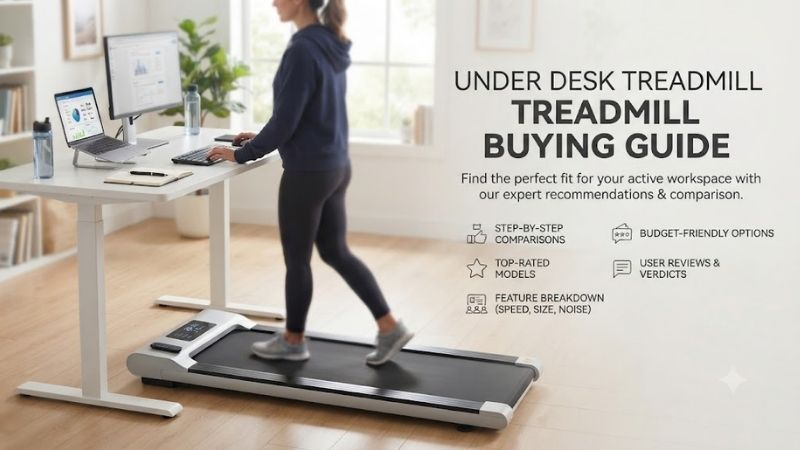
How Does an Under Desk Treadmill Work?
An electric motor moves a continuous belt across a walking deck. The user controls belt speed through a remote, integrated buttons, or a compatible application.
Some models include displays showing elapsed time, distance, speed, and estimated activity metrics.
The treadmill operates independently of the desk, so the workstation must be positioned correctly to accommodate the user’s elevated standing height.
An under desk treadmill should only be used at speeds and durations approved by its manufacturer.
Under Desk Treadmill vs. Walking Pad
The terms under desk treadmill and walking pad are often used interchangeably, but the categories are not identical.
| Feature | Under Desk Treadmill | General Walking Pad |
|---|---|---|
| Primary purpose | Walking at a workstation | Compact walking |
| Desk compatibility | Central design consideration | Depends on model |
| Deck profile | Usually low | Often low |
| Controls | Designed for convenient low-speed adjustment | Varies |
| Handrails | Generally absent | May be absent or foldable |
| Speed range | Primarily walking speeds | Varies by model |
| Storage | Often portable or low-profile | Model-dependent |
| Best suited for | Working while walking | General low-speed walking |
A walking pad can function as an under desk treadmill if its dimensions, controls, operating requirements, and safety features are suitable for workstation use.
However, compatibility should be verified rather than assumed.
Under Desk Treadmill vs. Traditional Treadmill
Traditional treadmills generally provide larger running surfaces, upright consoles, and additional options for jogging or running.
An under desk treadmill usually sacrifices some of those capabilities to reduce its size.
Choose an under desk treadmill when low-speed walking during work is your main activity.
Choose a conventional treadmill if you require substantial handrail support, a larger exercise surface, or equipment designed for more demanding running workouts.
Essential Specifications to Compare Before Buying
The most important specifications are those that affect walking comfort, workstation compatibility, safety, and practical operation.
Motor horsepower or maximum speed should not dominate the purchasing decision.
For office walking, a comfortable belt and reliable low-speed controls may be more valuable than a high advertised performance rating.
1. Walking Belt Length and Width
The usable walking belt determines how much room you have for a natural stride.
A belt that is too short may encourage awkward stepping, particularly at faster walking speeds.
A narrow belt requires more precise foot placement and may feel restrictive when the user divides attention between walking and computer tasks.
The following are general shopping reference points, not universal fit standards.
| Usable Belt Dimension | Buying Consideration |
|---|---|
| Under 35 inches long | May restrict many adult walking strides |
| 35–39 inches long | Consider primarily for slower, shorter-stride walking |
| 40–44 inches long | More room for many casual walkers |
| 45 inches or longer | Potentially better for longer strides |
| Under 15 inches wide | Requires more deliberate foot placement |
| 16–18 inches wide | Offers greater lateral walking room |
Actual suitability depends on the user’s height, stride, walking speed, and comfort.
Taller users should not automatically assume that a compact treadmill will accommodate their natural walking pattern.
When reviewing specifications, distinguish the actual belt dimensions from the machine’s overall external dimensions.
2. Motor Power and Continuous Operation
Under desk treadmills typically use electric motors designed to move the belt at controlled speeds.
Manufacturers may advertise power in horsepower or watts.
However, a peak horsepower rating does not establish sustained operating capability.
For workstation use, investigate the machine’s documented operating limits instead of relying exclusively on motor claims.
Important considerations include:
-
Manufacturer-specified continuous operating duration
-
Required cooling or resting intervals
-
Maximum supported user weight
-
Speed-control behavior at low settings
-
Published motor specifications
-
Ventilation requirements
-
Motor warranty coverage
-
Availability of replacement parts
A treadmill described as suitable for working from home is not necessarily designed for uninterrupted operation throughout an eight-hour workday.
If you intend to walk frequently, prioritize a machine whose documented duty cycle accommodates your planned sessions.
3. Walking Speed Range
Low-speed performance is especially important for under desk treadmills.
The ability to make small, predictable speed adjustments may matter more than maximum speed.
| Speed | Approximate Pace | Potential Use |
|---|---|---|
| 0.5 mph | 120 min/mile | Very slow familiarization |
| 1.0 mph | 60 min/mile | Gentle desk walking |
| 1.5 mph | 40 min/mile | Comfortable desk walking for some users |
| 2.0 mph | 30 min/mile | Purposeful walking |
| 2.5 mph | 24 min/mile | Dedicated walking |
| 3.0 mph | 20 min/mile | Brisk walking for some users |
These pace values are mathematical equivalents, not recommendations for every user.
Walking while typing typically requires more coordination than walking without another task.
A slower pace may make keyboard and mouse use easier, but stability and attention should always determine the appropriate speed.
Avoid selecting a machine based only on a high maximum speed when your intended use is low-speed desk walking.
4. Maximum User Weight Capacity
Every treadmill has a manufacturer-defined weight limit.
Choose a machine whose published rating accommodates the intended user.
Do not exceed the specified capacity or assume that a similarly named product has the same limit.
A higher rating does not automatically prove superior stability or durability.
Frame design, deck construction, belt movement, assembly quality, and flooring conditions also influence how the treadmill behaves.
5. Deck Height
Deck height is especially important for under desk treadmill compatibility.
The treadmill raises your feet above the surrounding floor, which changes your effective standing height at the workstation.
For example, if a treadmill elevates your feet 5 inches, your desk may need approximately 5 additional inches of height adjustment to preserve a similar keyboard position.
The exact adjustment depends on your footwear, posture, and workstation configuration.
A low-profile treadmill may be easier to integrate with an existing adjustable desk, but it still needs to offer sufficient structural stability and appropriate floor clearance.
6. Overall Dimensions and Machine Weight
The treadmill’s external dimensions determine how it fits beneath the workstation.
Check overall length, width, and height, including motor housings and other protruding components.
Also evaluate its weight and transport features.
A compact machine may still be difficult to move, especially across carpeting or raised thresholds.
If you intend to store the treadmill after each work session, portability becomes an important purchasing factor.
Standing Desk Compatibility: What to Check
A treadmill and standing desk should function as a coordinated workstation.
Even when the treadmill fits physically beneath the desktop, the arrangement may be uncomfortable or unsuitable if the desk cannot adjust to an appropriate height.
Desk Height Adjustment
The desk must accommodate your elevated standing position while walking.
A practical way to estimate the required desk height is:
Required desk height ≈ comfortable standing desk height + treadmill deck height
For example, if your preferred standing desk height is 43 inches and the treadmill raises your feet by 5 inches, an initial target would be approximately 48 inches.
This is a starting estimate, not a guaranteed ergonomic setting.
Adjust the final position according to your posture, arm position, keyboard use, and visual comfort.
Desk Frame and Leg Clearance
Measure the space between the desk legs and any crossbars.
The treadmill must fit without interfering with the desk’s structure or height-adjustment mechanism.
Check for cables, power supplies, cable-management trays, and other components that could obstruct movement.
Do not position the treadmill where desk hardware can contact the belt or create a tripping hazard.
Monitor and Keyboard Position
Walking changes the way your body moves during computer use.
Place the keyboard and pointing device where they can be operated without excessive reaching.
Position the monitor to minimize uncomfortable neck posture.
Avoid leaning heavily on the desktop or using the desk as an improvised support rail.
A height-adjustable desk is not automatically designed to support a person’s body weight during a loss of balance.
Desk Stability While Walking
A desk that feels stable while standing may behave differently when the user walks nearby.
Check that the desk is properly assembled and installed on a suitable floor.
Monitor movement, keyboard position, and cable placement can all affect the walking experience.
If the workstation wobbles or encourages unstable posture, adjust the arrangement before continuing.
Noise and Vibration: Choosing an Office-Friendly Treadmill
Noise is an important consideration for home offices, shared workspaces, and apartment buildings.
Under desk treadmills generate sound from several sources, and advertised claims about quiet operation may not describe the complete experience.
Motor Noise vs. Footstep Noise
Motor noise comes from the drive system, while belt and roller components produce mechanical sound.
Footsteps create additional impact noise and vibration.
These effects depend on walking speed, user weight, flooring material, and building construction.
A machine that seems quiet inside your office may still transmit vibration through the floor.
Understanding Decibel Ratings
Some manufacturers publish noise ratings in decibels.
These figures are difficult to compare without details about the measurement method.
Useful information includes testing distance, user load, operating speed, and background noise.
An advertised low decibel figure is not a guarantee of quiet operation in an apartment or shared office.
Choosing a Suitable Floor Mat
An equipment mat may help protect certain flooring surfaces and reduce some vibration.
However, the mat must be compatible with both the treadmill and the floor.
Avoid materials that cause excessive rocking or block ventilation.
A mat cannot guarantee that footstep vibrations will become inaudible to people in adjacent rooms.
Using an Under Desk Treadmill During Meetings
A low-speed walking treadmill may be suitable for some virtual meetings.
However, sound from footsteps or the motor can be picked up by microphones.
The effect depends on microphone placement, room acoustics, machine construction, and noise-cancellation settings.
For important calls, test the arrangement under realistic conditions rather than assuming that a treadmill marketed as quiet will be suitable.
Safety Features Every Buyer Should Consider
Under desk treadmills often omit the large console and handrails of conventional treadmills.
This makes accessible controls, suitable walking dimensions, and stable operation particularly important.
Emergency Stop and Accessible Controls
Determine how the treadmill stops during normal and unexpected situations.
Some models use wireless remotes, onboard buttons, or dedicated safety mechanisms.
Look for a clearly documented stopping procedure that can be performed quickly.
A wireless remote should not automatically be treated as equivalent to a dedicated emergency-stop system.
Keep the approved stop control accessible while walking.
Smooth Acceleration and Deceleration
A treadmill should operate according to the manufacturer’s documented speed-control behavior.
Gradual and predictable changes can make it easier to maintain balance.
Avoid machines that exhibit unexpected speed changes, sudden belt movement, or inconsistent responses to controls.
Stop using a treadmill if it behaves abnormally.
Rear and Side Clearance
The treadmill requires unobstructed operating clearance.
The exact amount depends on the manufacturer’s instructions and applicable safety guidance.
Do not position the rear of the treadmill tightly against a wall, chair, cabinet, or other obstacle.
Keep access and exit routes clear.
An under desk treadmill must have adequate operating space even when the surrounding office is small.
Electrical Safety
Review the machine’s voltage, grounding, power connection, and circuit requirements.
Do not assume that extension cords, power strips, or shared circuits are acceptable.
Keep electrical cables away from the moving belt and walking area.
Follow the manufacturer’s ventilation requirements and do not cover motor openings.
Children and Pets
Keep children and pets away from the machine during operation.
Unplug and secure the treadmill when not in use, according to the manufacturer’s instructions.
Do not leave a powered treadmill unattended.
Storage and Portability for Home Offices
Convenient storage can be a major advantage when an office doubles as a bedroom or living area.
However, the storage design should match the actual available space.
Under-Bed Storage
Some low-profile treadmills can fit beneath beds.
Check the machine’s complete height, including protruding components and wheels.
Measure the clearance along the entire storage path.
Furniture legs, under-bed supports, and carpeting may prevent access even when the opening appears tall enough.
Only store the machine in a position approved by its manufacturer.
Closet Storage
A closet may provide convenient storage when it has sufficient depth, width, and clearance.
Check whether the treadmill must remain horizontal or can be stored vertically.
Do not assume upright storage is permitted.
Also ensure the machine can be moved without requiring unsafe lifting or awkward positioning.
Folding Under Desk Treadmills
Some models have folding handrails or decks to reduce storage dimensions.
Folding may improve convenience, but the mechanism introduces hinges and locking components that require proper use.
Check the exact folded dimensions and operating instructions.
A thin, non-folding treadmill may be more convenient than a thicker folding design for certain under-furniture storage locations.
Transport Wheels
Transport wheels can reduce the effort required to move the treadmill.
Their usefulness depends on wheel placement, flooring, and the machine’s weight.
A wheeled treadmill may still need to be lifted at one end.
If daily storage is necessary, review the manufacturer’s moving instructions before purchasing.
Under Desk Treadmill Features Worth Paying For
Many under desk treadmills include additional features intended to improve convenience. However, not every feature justifies a higher price.
For office walking, prioritize reliable basic operation before advanced technology.
| Feature | Main Benefit | Buying Priority |
|---|---|---|
| Accessible stop control | Allows prompt stopping | Essential |
| Comfortable walking belt | Supports natural foot placement | Essential |
| Suitable weight capacity | Matches the intended user | Essential |
| Reliable low-speed control | Makes desk walking more manageable | High |
| Low-profile deck | Improves desk compatibility | High |
| Transport wheels | Easier movement and storage | High if frequently moved |
| Remote control | Convenient speed adjustment | High |
| Digital display | Shows basic activity information | Moderate |
| Bluetooth connectivity | Connects compatible devices | Optional |
| Companion application | Provides additional settings or records | Optional |
| Automatic speed adjustment | Reduces some manual control | Optional |
| Incline function | Adds walking variety | Optional |
Remote Control vs. App Control
A remote control allows users to change speed without reaching toward the treadmill’s motor housing.
However, wireless remotes depend on batteries and communication reliability.
App-controlled machines may provide additional features, but buyers should confirm whether essential operations remain available without a smartphone or internet connection.
For most office users, straightforward and dependable controls are preferable to complicated connectivity.
Automatic Speed Adjustment
Some walking pads automatically adjust belt speed in response to the user’s position or movement.
This may be convenient, but it requires understanding how the system behaves.
Automatic acceleration should not interfere with balance or workstation tasks.
Buyers who prefer predictable operation may find manual speed adjustments easier to manage.
Built-In Activity Tracking
Common displays show speed, elapsed time, estimated distance, steps, and calories.
These metrics can help users monitor activity, although their accuracy varies by product.
Calorie estimates should be treated as approximations rather than precise measurements.
A readable display and intuitive controls generally matter more than extensive activity-tracking features.
Incline Functionality
Some compact treadmills offer manual or motorized incline.
Incline changes the walking angle and may increase the physical demands of walking at a given speed.
However, it can also increase deck height and complicate desk compatibility.
For users who mainly walk while typing, a flat, stable surface may be more practical.
Choose incline only when it serves a clear purpose, and never create an improvised incline by placing objects under the treadmill.
How Much Should You Spend on an Under Desk Treadmill?
The appropriate budget depends on expected usage, available space, and required performance.
A treadmill intended for occasional walking may not need the same operating capacity as one used repeatedly throughout the workday.
Budget Under Desk Treadmills
Budget models often focus on basic walking functionality.
They may include simple displays, remote controls, and compact decks.
Before purchasing, check the usable belt dimensions, manufacturer-rated capacity, operating limits, and warranty coverage.
A low price does not compensate for an unsuitable belt or inadequate safety controls.
Midrange Under Desk Treadmills
Midrange machines may provide more convenient storage, additional controls, or improved published specifications.
However, price alone does not prove that a treadmill is more durable or quieter.
Compare the exact features and manufacturer documentation to determine whether the additional expense offers a practical benefit.
Premium Under Desk Treadmills
Premium designs may include advanced folding mechanisms, connected software, automatic speed control, or additional exercise features.
These options can be useful, but they are not essential for routine desk walking.
A simpler machine with appropriate dimensions, dependable controls, and accessible service support may provide better long-term value.
Warranty and Replacement Parts
Warranty coverage is important because under desk treadmills contain components subject to mechanical wear.
Review coverage for the motor, belt, frame, electronics, and folding mechanisms.
Also examine shipping responsibilities, labor exclusions, and service procedures.
A long advertised warranty is less useful when replacement parts or technical support are difficult to obtain.
How to Use an Under Desk Treadmill Comfortably
A properly selected treadmill still requires a suitable workstation arrangement.
Walking while working introduces additional movement and coordination demands.
Start With Low-Speed Walking
Begin at a slow speed and become familiar with the treadmill’s controls.
Practice starting, stopping, and maintaining a comfortable walking position before attempting computer tasks.
Gradually determine which speeds work for your activities.
Do not force a pace that interferes with balance or attention.
Alternate Walking and Sitting
An under desk treadmill does not require continuous use throughout the workday.
Alternating between walking, standing, and sitting can accommodate different tasks and personal preferences.
The appropriate duration depends on the user and the machine’s published operating limits.
Take breaks as needed and follow any required cooling intervals.
Choose Suitable Footwear
Use footwear appropriate for treadmill walking and the manufacturer’s instructions.
Shoes should offer a secure fit and adequate traction.
Avoid loose clothing or accessories that could interfere with the moving belt.
Do not assume that barefoot use or socks alone are permitted.
Match Walking Speed to Work Tasks
Different activities require different amounts of concentration and coordination.
| Work Activity | Practical Consideration |
|---|---|
| Listening to meetings | May be manageable at a comfortable low speed |
| Reading documents | Requires stable posture and visual focus |
| Typing | Often easier at slower speeds |
| Mouse-intensive tasks | May require reduced speed or stopping |
| Video meetings | Consider microphone noise and camera movement |
| Detailed design work | May be better performed while stationary |
| Tasks requiring precise concentration | Stop walking if attention or balance is affected |
Walking during computer work is optional, not necessary for every task.
If an activity requires intense concentration or compromises safe walking, stop the treadmill.
Under Desk Treadmill Maintenance and Reliability
Regular care helps maintain operation and identify potential problems.
Maintenance requirements differ by model, so the product manual should always take priority.
Belt Cleaning
Dust, lint, hair, and debris can accumulate around the walking belt and motor housing.
Disconnect the treadmill from power before cleaning, unless the manufacturer explicitly instructs otherwise.
Clean accessible surfaces using approved methods.
Avoid spraying cleaning solutions directly into electrical components.
Belt Lubrication
Some under desk treadmills require periodic lubrication to reduce friction between the belt and deck.
Other models have different maintenance requirements.
Use only the lubricant specified by the manufacturer and follow the recommended procedure.
Incorrect lubrication can create additional wear or operating problems.
Belt Alignment and Tension
A belt that repeatedly drifts to one side may require adjustment.
Likewise, slipping, unusual jerking, or inconsistent belt movement can indicate a problem.
Do not continue operating a malfunctioning treadmill.
Follow the manufacturer’s servicing instructions or contact qualified support.
Signs That a Treadmill Needs Attention
Stop using the machine when you notice:
-
Unexpected speed changes
-
Repeated belt slipping
-
Burning odors or smoke
-
Abnormal heating
-
Unusual mechanical sounds
-
Damaged power cables
-
Unresponsive controls
-
Visible structural damage
A treadmill that behaves unpredictably should not be used until the issue has been properly resolved.
Common Under Desk Treadmill Buying Mistakes
Several purchasing mistakes can make an otherwise functional treadmill inconvenient or unsuitable.
Choosing the Smallest Model Available
An extremely compact design may save space but restrict walking comfort.
Prioritize sufficient belt length and width before minimizing machine dimensions.
Ignoring Standing Desk Height
A treadmill can fit beneath a desk while making the keyboard position uncomfortable.
Account for the increased standing height created by the treadmill deck.
Assuming Every Machine Supports All-Day Walking
Marketing descriptions such as office treadmill or work-from-home walking pad do not establish continuous operating capability.
Check the manufacturer’s duty-cycle requirements.
Overlooking Safe Operating Clearance
Do not assume that a treadmill is safe to operate simply because it fits between furniture.
Keep the necessary space around the belt clear.
Relying on Unverified Quietness Claims
An advertised low noise rating may not reflect footstep vibration or sound transmission through apartment floors.
Consider your actual environment rather than relying on a single decibel figure.
Forgetting About Storage Weight
A machine designed to slide beneath furniture may still be heavy or awkward to move.
If you plan to store it daily, transportation convenience matters.
Ignoring Product Safety Notices
Before purchasing, verify that the exact model is not subject to applicable recalls or stop-use warnings.
This is especially important for unfamiliar brands and secondhand equipment.
How to Choose the Right Under Desk Treadmill for Your Needs
Different buyers should prioritize different characteristics.
| Buyer Type | Features to Prioritize | Main Trade-Off |
|---|---|---|
| Home-office worker | Low-speed control, desk compatibility | Limited higher-speed exercise |
| Apartment resident | Stable operation, suitable flooring, manageable noise | Vibration may still travel |
| Tall user | Longer walking belt | Larger footprint |
| Small-space buyer | Low stored height, transport wheels | Potentially smaller belt |
| Frequent walker | Suitable duty cycle, maintainability | Potentially heavier equipment |
| Beginner | Simple controls, stable walking area | Fewer advanced features |
| Budget buyer | Essential safety and fit specifications | Limited convenience features |
| Shared office user | Accessible controls, noise considerations | May need shorter sessions |
Best Priorities for Home Offices
Choose a low-profile treadmill that fits beneath your desk while providing adequate walking room.
Check desk height, clearance, controls, and the machine’s operating limits.
A predictable speed range is more important than a high maximum speed.
Best Priorities for Apartments
Pay particular attention to noise, vibration, flooring compatibility, and storage convenience.
A protective mat may be useful when permitted by the manufacturer, but it cannot guarantee silent operation.
Consider the location of neighboring living spaces and any applicable building rules.
Best Priorities for Small Rooms
Measure both the operating and storage areas.
A treadmill that can slide beneath furniture may be especially convenient, provided the storage orientation is approved and the machine can be moved safely.
Do not sacrifice required clearance to fit the equipment into a confined room.
Best Priorities for Frequent Walking
Look for a machine with documented operating limits suitable for repeated sessions.
Review maintenance requirements, warranty terms, replacement-part availability, and reliable low-speed performance.
For long or demanding exercise sessions, a conventional treadmill may be more appropriate.
Under Desk Treadmill Buying Checklist
Use this checklist before selecting a specific model.
| Buying Factor | What to Verify | Priority |
|---|---|---|
| Intended use | Approved for low-speed desk walking | Essential |
| Walking belt | Fits your natural stride | Essential |
| Weight capacity | Meets the user’s requirements | Essential |
| Stop controls | Accessible and reliable | Essential |
| Operating clearance | Meets manufacturer requirements | Essential |
| Electrical compatibility | Suitable power supply and connection | Essential |
| Desk height | Accommodates the treadmill deck | High |
| Low-speed control | Predictable speed adjustments | High |
| Machine footprint | Fits beneath the desk | High |
| Duty cycle | Suitable for planned sessions | High |
| Storage dimensions | Fits the intended location | High |
| Portability | Manageable weight and movement | High |
| Floor compatibility | Approved supporting surface | High |
| Noise and vibration | Appropriate for the environment | High |
| Maintenance | Clear servicing instructions | High |
| Warranty | Written coverage and support | High |
| Remote control | Convenient speed adjustments | Moderate |
| Digital display | Useful activity information | Moderate |
| App connectivity | Additional tracking and settings | Optional |
| Incline | Additional walking variety | Optional |
Frequently Asked Questions
Is an Under Desk Treadmill Worth Buying?
An under desk treadmill can be worthwhile for people who want convenient low-speed walking during suitable work activities.
Its value depends on workspace compatibility, walking comfort, available room, and how frequently it will be used.
If your main goal is running or higher-intensity exercise, a conventional treadmill may be a better choice.
What Is a Good Speed for an Under Desk Treadmill?
Many users may find approximately 1–2 mph manageable for certain desk activities, but the appropriate pace varies.
Begin slowly and adjust according to comfort, balance, and the concentration required by your work.
A speed suitable for listening to a meeting may be too fast for detailed typing or precision tasks.
Can You Use an Under Desk Treadmill All Day?
Do not assume that an under desk treadmill is designed for continuous operation throughout an entire workday.
Check the manufacturer’s recommended session duration and cooling requirements.
The user should also take breaks and vary activity according to comfort and individual needs.
Do Under Desk Treadmills Work With Any Standing Desk?
No. Compatibility depends on treadmill height and dimensions, desk adjustment range, frame clearance, and workstation layout.
A treadmill may fit physically beneath the desk while preventing a comfortable keyboard position.
Measure carefully before purchasing.
Are Under Desk Treadmills Noisy?
All motorized treadmills produce some sound and vibration.
Actual noise depends on machine construction, walking speed, flooring, user movement, and room acoustics.
Advertised noise figures should be interpreted in the context of their measurement methods.
Can You Run on an Under Desk Treadmill?
Many under desk treadmills are primarily designed for walking.
Some compact models support faster exercise, but running suitability must be confirmed through the manufacturer’s specifications.
Do not use a walking-only machine for running simply because its motor can reach a higher speed.
Conclusion
The right under desk treadmill should provide a comfortable walking surface, dependable low-speed control, appropriate weight capacity, and safe operation within your workspace. Before purchasing, measure your standing desk, evaluate deck height and storage requirements, and verify the manufacturer’s operating limits. Prioritize equipment that fits your daily routine and offers reliable controls, manageable maintenance, and suitable support rather than paying extra for features that do not improve your actual walking experience.
Write Your Review
No reviews yet. Be the first to share your experience!