
Key takeaways
- Check the seat post, handlebar clamp, and pedal bolts for any play, tightening with the included tools.
- Confirm the resistance knob turns smoothly through its full range without slipping.
- Look at the leveling feet and adjust them so the bike does not rock on your floor.
A Peloton Bike is a significant investment, and treating it like one pays off in years of quiet, smooth rides. Sweat, dust, and daily use gradually wear on the belt, cleats, and touchscreen, but a consistent maintenance routine keeps the resistance responsive and the frame looking new. The good news is that most upkeep takes only a few minutes a week.
This step-by-step guide walks through cleaning, hardware checks, pedal care, and the small accessories that extend your bike’s lifespan. Follow it and your Peloton will feel as tight and responsive years from now as it did on day one.
Our top picks




As an Amazon Associate we earn from qualifying purchases at no extra cost to you.
⚡ Save on Your Next PC — Amazon Prime
Prime members get fast free shipping on the systems above, plus early access to Prime Day & Black Friday PC deals. New members get a 30-day free trial.
Watch: How to Maintain Your Peloton Bike for Longevity: A Step-by-Step Guide — Video Review
Wipe Down After Every Ride
Sweat is corrosive. After each session, wipe the handlebars, frame, and touchscreen with a soft microfiber cloth and a mild, non-abrasive cleaner. Avoid spraying liquid directly onto the screen; mist the cloth instead. Pay special attention to the area beneath the seat and near the flywheel where sweat collects and can pit metal over time.
Inspect and Tighten Hardware Monthly
- Check the seat post, handlebar clamp, and pedal bolts for any play, tightening with the included tools.
- Confirm the resistance knob turns smoothly through its full range without slipping.
- Look at the leveling feet and adjust them so the bike does not rock on your floor.
Care for the Pedals and Cleats
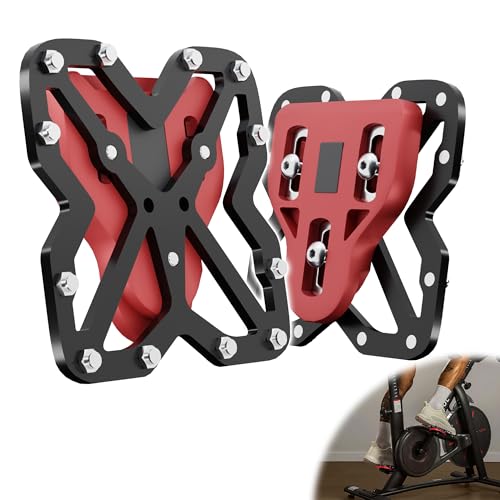
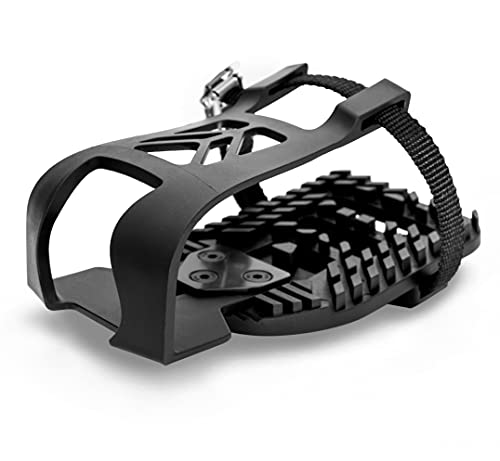
The stock Peloton pedals use a Look Delta cleat system, and the cleats are the most common wear point. Inspect them monthly for cracks and replace them before they fail mid-ride. If you prefer riding in sneakers, pedal converters and toe cages let you skip cleated shoes entirely. Products like the Dual Function Toe Cages for Peloton Bike & Bike+ Pedals or the FWUNYVN Pedal Converter adapt the Look Delta pedals for regular shoes, and BUCKLOS Bike Pedal Clips Adapters offer a budget replacement option.
Keep the Belt Drive Healthy
Peloton bikes use a belt rather than a chain, so there is no oiling required, but the belt tension should stay consistent. If you notice slipping under high resistance or hear an unusual whir, contact support before riding further. Keeping the bike out of humid areas and off carpet padding that traps moisture helps the belt and bearings last longer.
Protect Accessories and Contact Points
Replacement foot pads, such as Crostice Foot Pads for Peloton Bike & Bike+, keep the stabilizers from marking your floor and reduce vibration. Store water bottles in the cages rather than balancing them on the frame, where spills can seep into electronics.
Tips
- Place the bike on a dedicated mat to catch sweat and protect both the floor and the bike’s base.
- Keep the touchscreen firmware updated for the smoothest software performance.
- Replace Look Delta cleats every few months of heavy riding, sooner if you hear clicking.
- Never use harsh solvents or abrasive pads on the screen or powder-coated frame.
Frequently Asked Questions
Do I need to oil a Peloton Bike?
No. The belt-drive system is maintenance-free in terms of lubrication. Focus instead on cleaning, hardware checks, and cleat care.
Can I ride my Peloton in regular sneakers?
Yes, with pedal converters or toe cages that adapt the Look Delta pedals. This is a popular upgrade for households that share one bike.
How often should I replace the cleats?
Inspect them monthly and replace them every three to six months of frequent riding, or immediately if you see cracks.
What is the best cleaner for the touchscreen?
Use a slightly damp microfiber cloth with a mild, alcohol-free cleaner. Always apply the cleaner to the cloth, never directly to the screen.
Conclusion
Peloton longevity comes down to small, consistent habits: wipe after every ride, tighten hardware monthly, watch the cleats, and protect the contact points. Add a few inexpensive accessories like toe cages or replacement foot pads, and your bike will deliver reliable, quiet rides for many years.







Write Your Review
No reviews yet. Be the first to share your experience!