
Our Top Picks
Best Reolink Security Cameras: Choose by Power, Connection, and Coverage
The best Reolink security camera depends on where it will go: choose a wired PoE model for dependable, continuous coverage; a Wi-Fi camera for a nearby outlet and simpler installation; or a battery-powered model when there is no practical cable route. Compare resolution and detection features alongside power and storage—high resolution alone won’t help if the camera can’t reliably connect or record.
Quick comparison by camera type
Reolink’s lineup changes over time, and exact specifications vary by model. The figures below describe representative product families and common configurations; check the current model’s specification sheet before buying, particularly for field of view, battery capacity, and included storage.
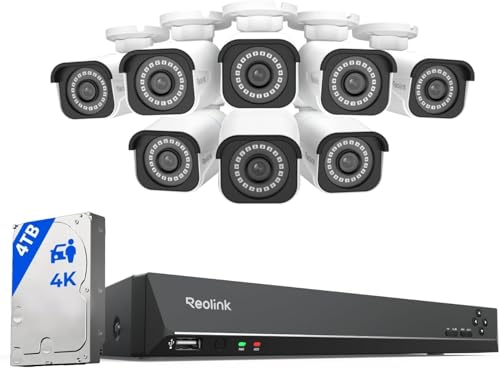
REOLINK 16CH 4K Security Bullet Camera System with 4TB HDD RLK16-800B8
Picked as a relevant option in this category.
View on Amazon
REOLINK 5MP 8CH Home Security Camera System with 2TB HDD RLK8-520D4-5MP
Picked as a relevant option in this category.
View on Amazon
REOLINK 16CH 4K Security Dome Camera System with 4TB HDD RLK16-800D8
Picked as a relevant option in this category.
View on Amazon
REOLINK 8CH 4K/8MP Home Security Camera System with 2TB HDD RLK8-800D4
Picked as a relevant option in this category.
View on Amazon| Camera type | Typical resolution | Power and connection | Recording and storage | Best fit |
|---|---|---|---|---|
| PoE turret or bullet | 8 MP (4K) common; some models offer higher resolution | One Ethernet cable carries data and power; requires a PoE switch, injector, or NVR port | Continuous or event recording to microSD on supported models, NVR, or compatible network storage | Permanent outdoor coverage and several-camera systems |
| Plug-in Wi-Fi camera | Typically 5 MP to 8 MP, depending on model | Wi-Fi for data; nearby outlet for power | Usually microSD and/or Reolink NVR; some models support additional network recording options | Homes with a strong Wi-Fi signal and accessible power |
| Battery Wi-Fi camera | Commonly 2K-class or higher, model-dependent | Rechargeable battery; Wi-Fi; optional compatible solar panel on selected models | Often microSD and/or Reolink Home Hub, with recording behavior dependent on model | Sheds, gates, and other places without convenient power |
| Cellular camera | Varies; check the specific model | Battery or solar power plus a supported cellular connection and data plan | Local storage options vary; remote access uses mobile data | Remote property with no usable home Wi-Fi |
| Floodlight camera | Often 4K on selected models | Wired power; Wi-Fi or Ethernet varies by model | May support local storage and/or NVR recording, depending on model | Driveways and entrances where illumination is also wanted |
Resolution is stated in megapixels: 8 MP is commonly marketed as 4K, though image quality also depends on lens, sensor, lighting, and compression. Digital zoom enlarges pixels; it does not create extra detail.
Best choice by installation situation
- For a permanent multi-camera setup: PoE. Ethernet is generally more dependable than Wi-Fi at the edge of a property, and a single cable per camera avoids a separate power lead. The trade-off is installation work: you need to route Ethernet and provide PoE through a switch, injector, or recorder.
- For a porch or room near an outlet: plug-in Wi-Fi. It avoids Ethernet runs, but the camera still needs power and a strong signal. Test Wi-Fi at the intended mounting point, not just inside the house.
- For a location with no outlet: battery-powered. This is easier to place, but many battery cameras record motion-triggered clips rather than continuous video. Frequent activity, cold weather, and repeated live viewing can increase charging needs. A solar panel can reduce manual charging when the model supports one and the panel gets adequate sun; it does not guarantee uninterrupted operation.
- For a site without broadband: cellular. Check carrier coverage at the exact location, not only the general area. Account for a SIM and data plan, and verify that the camera’s remote-viewing and storage features suit your needs.
- For light and video together: floodlight. Confirm the model’s power and network requirements before purchase. A permanently mounted light may require suitable wiring and a secure mounting surface.
What to compare before buying
Resolution and field of view
For identifying activity near a doorway, placement and angle can matter more than choosing the highest megapixel count. A wide view covers more area but makes distant people and objects smaller in the frame. For a long driveway, consider a camera with a narrower view or optical zoom if offered, and aim it at the approach rather than trying to cover the whole property in one shot. Check whether the listed resolution is the camera’s native resolution and whether any advertised zoom is optical or digital.
Power, Wi-Fi, and recording continuity
PoE and other wired cameras are the strongest fit when you want scheduled or continuous recording, provided the recorder and camera support that mode. Plug-in Wi-Fi cameras can also suit fixed installations, but wireless signal strength and router placement affect reliability. Battery cameras prioritize flexible placement and event recording; confirm whether continuous recording is available before choosing one for a critical area.
A useful pre-installation check is to stream live video from the proposed camera position for several minutes, including at the time of day when the network is busiest. For PoE, measure the cable route and allow extra length at corners and service points. Long outdoor runs need cable and installation practices rated for the location.
Storage: local, recorder, or cloud
Many Reolink cameras support microSD cards, while compatible Reolink NVRs can store footage from multiple cameras. Some models and configurations also offer cloud service, but availability, features, and plans can vary by region. Confirm compatibility: not every camera works with every recorder or supports every recording option.
Storage capacity is not the same as retention time. As a rough estimate, a 128 GB card holds about 0.29 TB in decimal units. At an average recording rate of 2 megabits per second, continuous footage uses roughly 21.6 GB per day, so 128 GB would hold around six days before allowing for formatting, variable bitrates, and reserved space. Motion-only recording can last much longer, but busy scenes may generate near-continuous events. Treat this as a planning estimate, not a guaranteed retention figure.
Detection and alerts
Reolink offers different detection capabilities across models, including person, vehicle, or animal detection on selected cameras. Check the specific model rather than assuming every camera has the same classifications. Detection zones and sensitivity controls can help reduce alerts from roads, trees, or neighboring property. They need adjustment after installation: set zones around the area you want to monitor, then review alerts for several days and tune sensitivity if routine movement is triggering them.
Battery models may use different detection and recording behavior from wired models to conserve power. If you need to capture activity that starts outside the camera’s detection range, check the trigger and pre-recording options, if any, and position the camera so subjects approach the monitored area rather than moving across its edge.
Installation and ownership trade-offs
Before drilling, check the camera’s power source, Wi-Fi or cellular signal, viewing angle, and access for future maintenance. Mounting too high can make tampering harder but can also make faces less identifiable. Avoid pointing directly at bright lights, and check the view after dark because infrared illumination can reflect from nearby walls, eaves, or glass.
For battery models, plan for periodic charging and keep a safe way to reach the camera. A compatible solar panel can reduce visits, but shaded placement, winter daylight, and weather can limit charging. For microSD recording, use a card compatible with the camera and suited to repeated recording; check playback occasionally and replace a card if recording errors appear. Keep firmware updated, use a strong unique account password, and enable available account security features.
Bottom line
Choose PoE for a stable, expandable system and continuous recording; plug-in Wi-Fi for a simpler fixed camera near power; battery for cable-free locations where event recording is enough; and cellular for remote sites without Wi-Fi. Then narrow the choice by the exact model’s resolution, storage compatibility, detection features, and installation requirements. That order helps avoid paying for resolution or features the location cannot reliably support.









Write Your Review
No reviews yet. Be the first to share your experience!