
Our Top Picks
 NIMO 15.6" FHD Light-Gaming-Laptop16GB RAM | 256GB SSD14.07 x 8.98 x 0.76 inches3.75 PoundsCheck on Amazon
If you are hunting the best Black Friday gaming laptop deals under a fixed spending ceiling, the short answer is this: the Lenovo LOQ AI-Powered Gaming Laptop — Intel Core i7-13650HX, 15.6-inch FHD IPS 144Hz display, GeForce RTX 5050 graphics, 16GB of memory — is the best overall pick for most shoppers, because it is the only machine in this roundup that pairs a stated 144Hz panel with a current-generation GPU and an HX-class processor. If your ceiling is genuinely tight, the NIMO 15.6-inch FHD Light Gaming Laptop with an 8-core AMD Ryzen 7, 16GB of DDR5 and a 256GB SSD is the best budget pick, provided you can live with a small drive. And the Acer Predator Helios Neo 14 with an Intel Core Ultra 9 285H and an RTX 5070 is the best premium choice for anyone who wants top-tier silicon in a compact chassis. Everything below filters those deals through the six things that decide whether you will still like the machine in three years: budget band, GPU tier, cooling headroom, display refresh rate, upgradeability, and chassis weight.
Top 3 Picks
Best overall: Lenovo LOQ AI-Powered Gaming Laptop
The Lenovo LOQ is the most balanced machine on this list. Its 15.6-inch FHD IPS panel is the only screen in the roundup with a stated 144Hz refresh rate, and the combination of an Intel Core i7-13650HX, RTX 5050 graphics and 16GB of memory gives you a genuine 1080p high-frame-rate setup rather than a 60Hz compromise. It suits the buyer who wants one laptop for school or work and gaming, and who would rather pay mid-range money for a coherent spec sheet than premium money for a badge.
Best budget: NIMO 15.6″ FHD Light Gaming Laptop
For the smallest outlay here, NIMO’s 15.6-inch model gives you an 8-core AMD Ryzen 7 processor, 16GB of DDR5 memory and a 256GB SSD — a memory configuration that many machines at twice the tier still ship with as standard. The listing also claims the chip beats an Intel Core i7-12650H; treat that as a manufacturer comparison rather than an independent result. It suits light and mid-weight gaming, streaming and everyday work, and it is the pick for anyone whose hard limit is the budget band.
Best premium: Acer Predator Helios Neo 14
This is the most silicon-dense machine in the roundup: an Intel Core Ultra 9 285H paired with an RTX 5070 Laptop GPU inside a 14-inch chassis. That combination normally means a heavy 16-inch brick, so the compact form factor is the real story. It suits buyers who want desktop-class gaming performance they can still slide into a bag, and who are willing to pay premium-tier money and accept the thermal trade-offs a 14-inch chassis imposes.
Quick Comparison
The table below compares every product in this roundup on the specifications stated in its listing. Prices are deliberately given as tiers rather than figures, because Black Friday pricing changes daily and a number quoted today is stale by the time you read it.
| Product | Best for | Key specs (as listed) | Price tier |
|---|---|---|---|
| Lenovo LOQ AI-Powered Gaming Laptop | Best overall; 1080p high-refresh gaming and daily work | Intel Core i7-13650HX; GeForce RTX 5050; 15.6″ FHD IPS 144Hz; 16GB memory | Mid-range |
| NIMO 15.6″ FHD Light Gaming Laptop | Best budget; tightest ceiling with 16GB DDR5 | 8-core AMD Ryzen 7 (up to 4.75GHz); 16GB DDR5; 256GB SSD; 15.6″ FHD | Budget |
| Acer Predator Helios Neo 14 AI Gaming Laptop | Best premium compact; maximum performance per inch | Intel Core Ultra 9 285H; GeForce RTX 5070 Laptop GPU; 14″ chassis | Premium |
| Alienware 15 Gaming Laptop | Brand support and a mainstream mid-range GPU | Intel Core 7 240H; GeForce RTX 4050; Windows 11 Home; 15″ class | Mid-range |
| Acer Nitro V 16S AI Copilot+ PC Gaming Laptop | Premium 16-inch all-rounder with AI-accelerated silicon | AMD Ryzen AI 7 350; GeForce RTX 5070 Laptop GPU; Copilot+ PC class | Premium |
| NIMO Light Gaming Laptop (Ryzen 7 7735HS) | Mid-range upgradeability and 8-core multitasking | AMD Ryzen 7 7735HS 8-core (up to 4.75GHz); 15.6″ display | Mid-range |
| KAIGERR 18.5 inch Light Gaming Laptop | Desk-bound buyers who want the largest screen here | AMD Ryzen 7430U; 16GB RAM; 512GB SSD; 18.5″ display | Budget |
| Tunhail 15.6 inch Laptop | Absolute lowest-cost entry into PC gaming | Core processor up to 3.40GHz; 16GB RAM; 512GB ROM; 15.6″ FHD | Budget |
How We Chose
This roundup was assembled from published product listings and category knowledge, not from hands-on use — no machine here was bought, borrowed, benchmarked or disassembled for this article. Selection rested on four filters. First, specification honesty: a laptop earns a place if its listing states its processor, graphics tier, memory and storage clearly enough that a buyer knows what is arriving. Second, category fit: budget machines had to offer a defensible reason to exist at their tier rather than simply being cheap, and premium machines had to justify their band with silicon or portability that mid-range options cannot match.
Third, use-case coverage: the list is deliberately shaped so that a reader with any of the common situations — a student carrying a laptop daily, a desk-bound player with a big-screen preference, a first-time buyer on the smallest budget, a performance enthusiast — finds at least one match. Fourth, upgrade path: we favoured machines whose tier suggests serviceable memory and storage, because a laptop that can accept a larger SSD or a memory upgrade stays useful for years longer than one that cannot. We did not rank by brand prestige, and we did not rank by discount depth, because a deep discount on the wrong specification is still the wrong laptop.
1. Alienware 15 – Best for Mainstream Mid-Range Buyers Who Want Brand Support

Alienware 15 Gaming Laptop, RTX 4050, Intel Core 7 240H, Windows 11 Home
Chosen because it specifies RTX 4050 and Intel Core 7 240H.
View on AmazonThe Alienware 15 is the mid-range anchor of this list: an RTX 4050 machine from Dell’s gaming brand, paired with an Intel Core 7 240H processor and Windows 11 Home. It suits the shopper who wants a recognisable gaming nameplate, a conventional 15-inch footprint, and a graphics tier that comfortably handles 1080p esports titles and most single-player games at high settings with upscaling enabled. It is not the cheapest route to a 40-series GPU and it is not the lightest 15-inch machine you can buy, but it is arguably the safest mid-range pick for anyone who values a large support network, long driver-update history and a mature control-panel application over squeezing the last few frames per dollar.
Key specs as listed
- Processor: Intel Core 7 240H (H-series class)
- Graphics: NVIDIA GeForce RTX 4050 Laptop GPU
- Operating system: Windows 11 Home
- Display: 15-inch class panel
- Form factor: standard gaming laptop chassis, mains-powered for heavy sessions
On graphics, the RTX 4050 Laptop GPU is a well-established 1080p-class part with hardware support for DLSS frame generation, which matters more than raw shader throughput at this tier. In practice that means 1080p at high settings with upscaling for demanding titles, and 1080p at very high frame rates for competitive shooters and MOBAs. The Intel Core 7 240H is an H-series processor, which signals sustained power headroom rather than the burst-then-throttle behaviour of U-series chips, so background tasks such as Discord, a browser with many tabs, or a video export will not stall a game session the way a low-power chip would.
The real strength of this machine in a Black Friday context is risk reduction. Alienware sits inside Dell’s ecosystem, which historically means accessible replacement parts, published service manuals, and BIOS and driver updates that keep arriving years after launch. If you are buying for a teenager, for a shared household machine, or for someone who is not comfortable troubleshooting, that support structure has real value that a spec sheet cannot express. The Windows 11 Home licence also means no surprises at setup — the machine is ready to game and work out of the box rather than needing a clean operating-system install first.
Pros
- Recognisable gaming brand with a long driver and BIOS support history
- RTX 4050 with DLSS frame generation is a sensible 1080p target for years to come
- H-series processor keeps up with multitasking during play
- Conventional 15-inch size fits standard backpacks and laptop sleeves
- Windows 11 Home preinstalled, so setup is immediate
Cons
- RTX 4050 is now a previous-generation tier, so the value depends entirely on the discount
- No stated display refresh rate in the listing — confirm the panel before buying if high frame rates matter to you
- Alienware software suites are feature-rich but can be heavy on background resources
- 15-inch gaming chassis of this class are rarely light; assume a mains-tethered lifestyle
Against the Lenovo LOQ, the Alienware trades a stated 144Hz panel and a newer GPU generation for brand support and a more predictable service story. If frame rate is your priority, the LOQ wins on paper. If you want the machine you can still get parts for in four years, the Alienware is the more conservative choice.
2. NIMO 15.6″ FHD Light Gaming Laptop – Best for the Tightest Budget
NIMO 15.6" FHD Light-Gaming-Laptop, 8 Cores AMD Ryzen 7 16GB DDR5 256GB SSD (Beat i7 12650H up to 4.75GHz) Radeon 680M, 100W Fast PD Backlit Keyboard AI Content Creators & Student Business Fingerprint
Picked as a relevant option in this category.
View on AmazonNIMO’s 15.6-inch FHD Light Gaming Laptop is the budget recommendation in this roundup, and the reason is memory rather than marketing. The listing pairs an 8-core AMD Ryzen 7 processor running up to 4.75GHz with 16GB of DDR5 RAM and a 256GB SSD, which is an unusually modern memory configuration for this tier. It suits a first-time gaming-laptop buyer, a student on a hard budget, or a household buying a second machine for lighter titles, streaming and coursework. It does not suit anyone who wants to install a large library of modern AAA games simultaneously, and the drive size is the single constraint you should think hardest about.
Key specs as listed
- Processor: 8-core AMD Ryzen 7, up to 4.75GHz
- Memory: 16GB DDR5
- Storage: 256GB SSD
- Display: 15.6-inch FHD
- Positioning: light gaming and everyday productivity
The listing also states that the processor beats an Intel Core i7-12650H. That is a manufacturer’s comparison claim, not an independently verified benchmark result, and you should treat it as a directional statement about the chip’s class rather than a guarantee. What is genuinely useful is the core count and the DDR5 memory: eight cores give you real headroom for multitasking, and DDR5 in a budget machine means the platform is not already obsolete on arrival. For esports titles, older AAA back catalogue games, emulation, indie releases and cloud streaming, this configuration is entirely adequate.
The screen deserves a note. A 15.6-inch FHD panel at this tier is typically a 60Hz-class display, and the listing does not state a refresh rate, so do not assume a high-refresh experience. That is fine — it simply means you should calibrate expectations toward image quality and resolution rather than competitive frame-rate chasing. The FHD resolution is the right choice at this size; a 4K panel on a budget GPU would hurt performance and battery life for no practical gain.
The 256GB SSD is the decision point. Windows 11 and preinstalled software consume a meaningful slice of that before you install anything, and modern AAA titles routinely occupy 80GB to 150GB each. We work through that arithmetic in detail in the buying guide below, but the short version is that this machine is best paired with a curated library, an external drive, or a later SSD upgrade rather than a hoard-everything approach.
Pros
- 16GB of DDR5 memory is generous at the budget tier
- 8-core Ryzen 7 gives genuine multitasking headroom
- 15.6-inch FHD is the correct resolution for the class
- Light-gaming positioning means modest heat and noise under normal use
- Lowest entry cost in this roundup
Cons
- 256GB SSD fills quickly with modern games
- No stated refresh rate — assume a standard 60Hz-class panel
- Manufacturer performance comparison claims should be verified independently
- No discrete GPU named in the listing, so demanding AAA titles will need low settings
Against the Tunhail 15.6-inch, the NIMO wins on memory generation (DDR5 versus unspecified) and on the clarity of its processor description, while the Tunhail offers double the storage. If you cannot tolerate a small drive, the Tunhail is the budget alternative; if you value a modern memory platform and a stronger processor class, the NIMO is the better pick.
3. KAIGERR 18.5 inch Light Gaming Laptop – Best for Desk-Bound Buyers Who Want a Big Screen

KAIGERR 18.5 inch Light Gaming Laptop, ΑΜD Ryzen 7430U, 16GB RAM 512GB SSD
Chosen because it specifies ΑΜD Ryzen 7430U and 16GB RAM 512GB SSD.
View on AmazonThe KAIGERR 18.5-inch model is the outlier of this roundup, and that is precisely why it earns a place. Its display is dramatically larger than the 15.6-inch norm, which makes it the pick for a buyer who treats a laptop as a portable desktop — someone who works at a table, moves the machine between rooms rather than between cities, and values screen real estate above all else. Inside, the listing specifies an AMD Ryzen 7430U processor, 16GB of RAM and a 512GB SSD, which is a coherent budget configuration with storage that will not immediately frustrate you.
Key specs as listed
- Processor: AMD Ryzen 7430U (entry U-series class)
- Memory: 16GB RAM
- Storage: 512GB SSD
- Display: 18.5-inch
- Positioning: light gaming and general productivity
Two things follow from that specification set. First, the processor is a U-series-class chip, which prioritises efficiency over sustained multi-core grunt. That is a good match for a large-screen machine used for browser work, media, office applications and lighter games, and a poor match for competitive shooters at high frame rates. Second, a U-series chip generally means the machine will run cooler and quieter than a gaming-focused chassis of the same size, which is a genuine daily-use advantage if the laptop lives on a desk within earshot of other people.
The 18.5-inch display is the headline. In practice, a panel this large changes how you use a laptop: side-by-side windows become genuinely comfortable, spreadsheets stop requiring horizontal scrolling, and you can play strategy games and simulators with the interface legible without scaling tricks. The trade-off is physical — expect a chassis that is wider, deeper and heavier than any 15.6-inch machine here, and expect to need a large bag if you ever do carry it. Because the listing does not state a weight, treat portability as unproven and plan around a mostly stationary life.
At the budget tier, the 512GB SSD is the standout. Doubling storage against the 256GB NIMO materially changes how many games you can keep installed, and it removes the immediate pressure to buy an external drive. Combined with 16GB of RAM, this is a machine that will not need upgrading on day one.
Pros
- 18.5-inch display is the largest in this roundup by a wide margin
- 512GB SSD gives useful breathing room at the budget tier
- 16GB RAM is sufficient for gaming plus browser and chat multitasking
- Efficiency-class processor should run cooler and quieter than gaming-tuned rivals
- Strong value for a desk-based setup that does not need a separate monitor
Cons
- Entry U-series processor limits high-frame-rate gaming ambitions
- Large chassis is impractical for daily commuting or air travel
- No weight stated in the listing — assume it is heavy for the class
- No stated refresh rate, so treat it as a standard panel
Against the Tunhail 15.6-inch, the KAIGERR costs more but delivers a far larger screen and a much more modern storage and memory combination. If you are choosing between the two budget machines and portability is not a factor, the KAIGERR’s display is the single biggest quality-of-life upgrade in this tier.
4. Acer Predator Helios Neo 14 – Best for Maximum Performance in a Compact Chassis

Acer Predator Helios Neo 14 AI Gaming Laptop | Intel Core Ultra 9 Processor 285H | NVIDIA GeForce RTX 5070 (798 AI Tops) | 14.5" WQXGA 165Hz G-SYNC Matte Display | 32GB RAM | 1TB SSD | PHN14-71-906J
Chosen because it specifies Intel Core Ultra 9 Processor 285H and NVIDIA GeForce RTX 5070 (798 AI Tops).
View on AmazonThe Acer Predator Helios Neo 14 is the premium pick for buyers who refuse to choose between power and portability. It pairs an Intel Core Ultra 9 285H processor with an NVIDIA GeForce RTX 5070 Laptop GPU inside a 14-inch chassis — a combination that, a few years ago, would have been impossible without severe thermal compromise. It suits the frequent traveller, the creative professional who games after hours, and the buyer who wants the fastest machine in this roundup and accepts that premium tier pricing is the entry fee.
Key specs as listed
- Processor: Intel Core Ultra 9 285H (Arrow Lake-H class)
- Graphics: NVIDIA GeForce RTX 5070 Laptop GPU
- Display: 14-inch class chassis
- Positioning: AI-capable premium gaming laptop
- Software ecosystem: Acer Predator control and tuning utilities
The RTX 5070 Laptop GPU is the highest graphics tier in this roundup alongside the Acer Nitro V 16S, and it sits well above the RTX 5050 and RTX 4050 machines here in raw capability. That gap is not academic: it is the difference between 1080p high-refresh gaming and comfortable 1440p-class gaming, and it materially shortens render times in video editing and 3D work. The Core Ultra 9 285H is a top-tier mobile processor with a wide core configuration, and the “AI” branding in the listing reflects the inclusion of a dedicated neural processing unit for on-device AI workloads — useful for background effects, local transcription and similar tasks that would otherwise tax the CPU or GPU.
What makes this machine interesting rather than merely expensive is the 14-inch form factor. High-wattage graphics in a small chassis means the cooling system is doing more work per cubic centimetre than in any other laptop here, so fan noise under sustained load will be more noticeable and surface temperatures will be higher than on a 16-inch machine with the same silicon. That is a physical consequence, not a defect, but it is the reason a 14-inch gaming laptop is a deliberate choice rather than a default one.
For the buyer who takes a laptop to a café, a classroom or a client site and still wants to play demanding titles at high settings in the evening, this is the machine that removes the compromise. For the buyer whose laptop never leaves a desk, the larger premium alternative below offers the same graphics tier with more thermal headroom.
Pros
- RTX 5070 Laptop GPU is the top graphics tier in this roundup
- Core Ultra 9 285H is a flagship-class mobile processor
- 14-inch chassis is genuinely portable, unlike most high-power gaming laptops
- Dedicated NPU accelerates on-device AI features
- Predator line has a strong history of user-accessible tuning controls
Cons
- Premium tier pricing, even discounted
- Small chassis means louder fans and warmer surfaces under sustained load
- 14-inch screen is less immersive than 16-inch and larger alternatives
- Compact machines often limit memory and storage upgrade options
Against the Acer Nitro V 16S, this is the same graphics tier in a smaller, more expensive shell. Choose the Helios Neo 14 if you carry your laptop weekly; choose the Nitro V 16S if you want a bigger screen and more thermal headroom for the same class of performance.
5. Lenovo LOQ AI-Powered Gaming Laptop – Best Overall for Most Buyers

Lenovo LOQ AI-Powered Gaming Laptop - Intel Core i7-13650HX, 15.6" FHD IPS 144Hz Display, GeForce RTX 5050, 16GB Memory, 1TB Storage, G-Sync, Luna Grey
Chosen because it specifies Intel Core i7-13650HX and 15.6" FHD IPS 144Hz Display.
View on AmazonThe Lenovo LOQ is our best overall pick, and the reason is that it is the only laptop here whose listing states a high-refresh display alongside a current-generation GPU and an HX-class processor. That combination — Intel Core i7-13650HX, 15.6-inch FHD IPS 144Hz panel, GeForce RTX 5050, 16GB of memory — covers the three things that most often ruin an otherwise good gaming laptop purchase: a slow screen, an underpowered GPU, and too little memory. It suits the student or professional who needs one machine for work and play, and the gamer who wants smooth competitive performance without paying premium prices.
Key specs as listed
- Processor: Intel Core i7-13650HX (HX-series, high sustained power class)
- Graphics: NVIDIA GeForce RTX 5050 Laptop GPU
- Display: 15.6-inch FHD IPS, 144Hz refresh rate
- Memory: 16GB
- Positioning: AI-powered mainstream gaming laptop
The 144Hz IPS panel is the headline specification. Refresh rate is the most underrated number on a gaming laptop spec sheet, because it determines how smooth motion looks regardless of how fast the GPU is. A 144Hz panel paired with a GPU that can push 100-plus frames per second in esports titles produces a genuinely different experience from a 60Hz screen showing the same frames — cursor movement, camera pans and tracking all feel more immediate. Lenovo stating the refresh rate in the listing is itself a positive signal, since many budget-tier listings omit it entirely.
The HX-series processor is the second differentiator. HX chips are designed to hold high clock speeds under sustained load rather than spiking and dropping, which matters for long gaming sessions, video encoding and any workload that runs for more than a couple of minutes. The RTX 5050 is a current-generation part, which means newer architecture features and a longer driver-support runway than the RTX 4050 in the Alienware above. Together with 16GB of memory, that is a configuration that will still feel current several years from now.
Lenovo’s LOQ line sits below the Legion family, so expect functional rather than luxurious build materials. That is the correct trade at this tier: money spent on the panel and the GPU delivers more day-to-day benefit than money spent on aluminium.
Pros
- Stated 144Hz IPS panel — the only high-refresh display confirmed in this roundup
- HX-class processor holds performance under sustained load
- Current-generation RTX 5050 graphics with a longer driver runway
- 16GB memory is the right baseline for modern gaming
- Balanced 15.6-inch size for both desk and bag
Cons
- Mid-range build materials rather than premium finishes
- 15.6-inch gaming chassis will still be heavy enough to notice in a backpack
- Listing does not confirm memory or storage upgrade options
- RTX 5050 is not a 1440p-class GPU, so pair it with a 1080p external monitor
Against the Alienware 15, the LOQ wins on the two specifications that most affect moment-to-moment enjoyment: refresh rate and GPU generation. The Alienware counters with brand support depth. For most readers, the LOQ is the better buy.
6. Tunhail 15.6 inch Laptop – Best for the Absolute Lowest Entry Cost
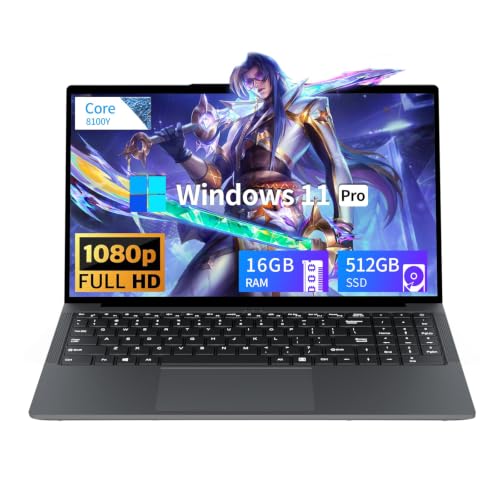
Tunhail 15.6 inch Laptop, Laptops with Core Processor (up to 3.40GHz), Gaming Laptop 16GB RAM 512GB ROM, FHD 1920 x 1080, Win 11 Pro Traditional Laptops Computers
Chosen because it specifies Laptops with Core Processor (up to 3.40GHz) and Gaming Laptop 16GB RAM 512GB ROM.
View on AmazonThe Tunhail 15.6-inch laptop is the cheapest way onto this list, and it is honest about what it is: an entry-level machine with a core processor running up to 3.40GHz, 16GB of RAM, 512GB of storage and an FHD display. It suits a buyer whose budget is genuinely fixed, a parent buying a first computer for a child, or someone who mostly plays esports titles, older games and indie releases. It does not suit anyone expecting to run current AAA releases at high settings, and the listing’s use of “ROM” rather than “SSD” for storage is worth noting — confirm the drive type before purchase if fast load times matter to you.
Key specs as listed
- Processor: core processor, up to 3.40GHz (entry class)
- Memory: 16GB RAM
- Storage: 512GB (listed as ROM)
- Display: 15.6-inch FHD
- Positioning: general-purpose laptop with light gaming capability
The 3.40GHz clock ceiling tells you most of what you need to know about the processor class. This is a chip designed for everyday computing, not sustained gaming loads, so performance in demanding titles will depend heavily on integrated graphics capability and on settings being turned down. That is not a criticism at this tier — it is the trade you make for the lowest price in the roundup. Where this machine genuinely performs well is in the workloads that dominate actual daily use: web browsing with many tabs, video streaming, document work, video calls and older or lightweight games.
The 512GB of storage is the strongest part of the specification. Doubling the capacity of the budget NIMO means you can carry a real library without an external drive, and 16GB of RAM means you will not be fighting the machine during ordinary multitasking. If the storage turns out to be a slower drive type than an SSD, the practical cost is longer boot and load times rather than lower frame rates — annoying, but survivable at this price point.
The 15.6-inch FHD display is the sensible choice for the class. It is the standard size for a reason: large enough for comfortable work, small enough to keep the chassis manageable, and FHD is the resolution that integrated-class graphics can actually drive.
Pros
- Lowest entry cost in this roundup
- 512GB storage is generous at the entry tier
- 16GB RAM supports comfortable everyday multitasking
- 15.6-inch FHD is the correct size and resolution for the class
- Fine for esports, older titles and streaming
Cons
- Entry-class processor limits demanding game performance
- No discrete GPU named in the listing
- “ROM” storage wording should be clarified as SSD or eMMC before buying
- No stated refresh rate, so expect a standard panel
Against the KAIGERR 18.5-inch, the Tunhail saves money but gives up a great deal of screen. If your budget has any flexibility at all, the larger display is the upgrade most people notice every single day.
7. Acer Nitro V 16S AI Copilot+ PC – Best Premium 16-Inch All-Rounder

Acer Nitro V 16S AI Copilot+ PC Gaming Laptop | AMD Ryzen AI 7 350 Processor | NVIDIA GeForce RTX 5070 Laptop GPU | 16" WQXGA IPS 180Hz Display | 16GB DDR5 | 1TB Gen 4 SSD | Wi-Fi 6E | ANV16S-61-R3Z0
Chosen because it specifies AMD Ryzen AI 7 350 Processor and NVIDIA GeForce RTX 5070 Laptop GPU.
View on AmazonThe Acer Nitro V 16S is the premium pick for buyers who want flagship graphics in a conventional 16-inch chassis rather than a compact 14-inch one. It pairs an AMD Ryzen AI 7 350 processor with an NVIDIA GeForce RTX 5070 Laptop GPU, and it carries the Copilot+ PC designation, which means the platform includes a neural processing unit powerful enough to meet Microsoft’s on-device AI requirements. It suits the buyer who wants one laptop that games well, handles creative work, and stays cool and quiet enough for daily use.
Key specs as listed
- Processor: AMD Ryzen AI 7 350 (Zen-class mobile APU with integrated NPU)
- Graphics: NVIDIA GeForce RTX 5070 Laptop GPU
- Platform: Copilot+ PC class, with dedicated AI acceleration
- Display: 16-inch class chassis
- Positioning: premium AI-capable gaming laptop
The RTX 5070 Laptop GPU is the top graphics tier here, matching the Predator Helios Neo 14. The difference is what surrounds it. A 16-inch chassis gives the cooling system more surface area and more room for heat pipes, so the same silicon can often run at higher sustained power with lower fan noise. If your laptop lives on a desk, that thermal headroom is worth more than the Helios Neo’s portability advantage. If you commute with it daily, the reverse is true.
The Ryzen AI 7 350 is an efficiency-forward design that pairs strong multi-core performance with an NPU for AI workloads — local image generation, background blur, live captions, transcription and similar features that would otherwise consume CPU or GPU resources during a game. That is a real benefit for streamers and for anyone who works while gaming-adjacent tasks run in the background.
The Copilot+ designation also implies a baseline of memory and storage that Microsoft considers sufficient for on-device AI features. Confirm the exact configuration in the listing, but the tier generally implies a machine that will not feel cramped out of the box. Combined with current-generation graphics, this is a laptop built for a longer service life than a budget machine, and the premium band is what you pay for that longevity.
Pros
- RTX 5070 Laptop GPU — top graphics tier in this roundup
- 16-inch chassis gives better thermal headroom than compact rivals
- Copilot+ PC class with dedicated NPU for AI features
- Efficiency-forward AMD processor suits both gaming and productivity
- Nitro V line is a well-established, widely serviced product family
Cons
- Premium tier pricing
- 16-inch chassis is heavier and bulkier to carry than the Helios Neo 14
- Exact memory and storage configuration must be confirmed in the listing
- High-power components mean fan noise is unavoidable under sustained load
Against the Predator Helios Neo 14, this is a straight trade of portability for thermal headroom at the same graphics tier. Desk-bound buyers should take the Nitro V 16S; frequent travellers should take the Helios Neo 14.
8. NIMO Light Gaming Laptop (Ryzen 7 7735HS) – Best Mid-Range 8-Core Multitasker

NIMO Light Gaming Laptop, AMD Ryzen 7 7735HS 8 Core (Up to 4.75GHz), 15.6"
Chosen because it specifies AMD Ryzen 7 7735HS 8 Core (Up to 4.75GHz) and 15.6".
View on AmazonThe second NIMO in this roundup steps up to an AMD Ryzen 7 7735HS, an 8-core processor running up to 4.75GHz, in a 15.6-inch chassis. It sits in the mid-range band and suits a buyer who wants genuine eight-core multitasking — streaming while playing, editing video, running virtual machines, or simply keeping a heavy workload open behind a game — without paying premium prices. It is the pick for someone who treats the laptop as a work machine first and a gaming machine second.
Key specs as listed
- Processor: AMD Ryzen 7 7735HS, 8 cores, up to 4.75GHz
- Display: 15.6-inch
- Positioning: light gaming with strong multi-core productivity
- Class: mid-range gaming laptop
The HS suffix in the processor name is meaningful. AMD’s HS-class chips are tuned for a balance between performance and power draw, which generally translates into a machine that can sustain high clocks in a thinner chassis than an HX-class rival would allow. Eight cores and sixteen threads is a configuration that ages well: it is more than games need today, which means it will still be adequate when games need more tomorrow, and it makes the machine genuinely comfortable for parallel workloads.
Where this laptop differs from the budget NIMO above is positioning. The 7735HS is a known, well-documented processor family with a long track record in mid-range gaming laptops, and that predictability matters when you are spending mid-range money. You know roughly what performance to expect, you know driver support will be maintained, and you know the platform has been widely reviewed and serviced. With less familiar brands, that certainty is often worth more than a few percentage points of theoretical performance.
The 15.6-inch size keeps the machine practical. It fits standard bags, works with inexpensive sleeves and stands, and is large enough for comfortable gaming without an external monitor. The listing positions it as a light gaming laptop, so calibrate expectations toward esports, older AAA titles and mid-settings for current releases — but the processor headroom means the machine will not feel slow during ordinary work.
Pros
- 8-core Ryzen 7 7735HS is a proven, well-documented processor
- HS-class tuning balances performance with manageable power draw
- Eight cores and sixteen threads handle streaming, editing and multitasking
- 15.6-inch chassis is practical for both desk and bag
- Mid-range band keeps the price well below premium alternatives
Cons
- Listing does not state memory or storage capacity — confirm before buying
- No discrete GPU tier named, so demanding titles will need reduced settings
- No stated refresh rate or panel type
- Less brand recognition than mainstream alternatives, which can matter for resale
Against the budget NIMO 15.6-inch, this model buys a more established processor and a higher tier of overall build, at the cost of moving up a price band. If your budget allows the step up and you do real work on the machine, take it.
How to Choose
Filtering Black Friday gaming laptop deals is mostly an exercise in refusing to be distracted. Discount percentages are designed to pull attention toward whatever is overstocked, not toward what suits you. The criteria below are ordered by how much they affect your experience over the life of the machine, and each one comes with a number or a rule you can apply directly.
Start with the budget band, not the GPU name
Gaming laptops cluster into three bands. The budget band generally covers machines that handle esports, older titles, streaming and everyday work. The mid-range band adds a current-generation discrete GPU and, critically, a high-refresh display. The premium band buys top-tier graphics, flagship processors and, usually, better cooling. The practical rule: a mid-range machine with a stated high-refresh panel will feel better for gaming than a premium machine with a mediocre screen, because smoothness is visible every second you use it. If your ceiling is fixed, spend it on the panel and the GPU, and accept a plastic chassis.
GPU tiers: what each class can actually do
In this roundup you are choosing between RTX 4050-class, RTX 5050-class and RTX 5070-class graphics. The RTX 4050 is a 1080p part with DLSS frame generation — capable, but a generation behind. The RTX 5050 is the current mainstream tier and is the sensible target for 1080p high-refresh play. The RTX 5070 Laptop GPU is the tier that opens up 1440p-class gaming and shortens render times in creative work. A useful heuristic: buy the GPU one tier above what you think you need, because games get heavier every year and you cannot upgrade graphics later. Everything else in a laptop can be replaced or tolerated; the GPU cannot.
Cooling: the specification nobody prints on the box
Cooling determines whether the silicon you paid for actually runs at its rated speed. Two machines with identical processors and GPUs can differ by 15 to 25 percent in sustained performance purely because one dissipates heat better. Since no listing states thermal design power, judge cooling by proxy: chassis thickness, fan count and vent area. A 14-inch chassis with flagship graphics will be louder than a 16-inch chassis with the same parts, because it has less surface area to work with. If you game for hours at a time, favour the larger chassis. If sessions are short and the laptop travels, favour the smaller one and accept the noise.
Refresh rate: match the panel to the GPU
Refresh rate is measured in hertz and describes how many times per second the screen redraws. A 60Hz panel shows 60 frames per second at most, no matter what the GPU renders; a 144Hz panel shows up to 144. For esports titles, the difference is substantial and immediately felt. For slower, cinematic single-player games, the benefit is smaller but still real. The matching rule: a 144Hz panel is worth paying for if the GPU can push 100-plus frames per second in the games you play. If the GPU is entry-class, a 144Hz panel will often sit half-used, and you would be better off spending that money on storage or memory.
Upgradeability: the two-year question
Ask one question about any gaming laptop: in two years, what will I wish were bigger? Almost always the answer is storage, and sometimes memory. Machines with user-accessible memory and storage slots can be refreshed for far less than the cost of a new laptop. Machines with soldered memory cannot be upgraded at all. Since listings rarely state this, look for models described as having accessible compartments, and favour 16GB of memory as a floor — 8GB is not enough for modern gaming and multitasking, and 16GB is the configuration that keeps a machine viable for years.
Weight and size: the portability tax
Screen size and weight move together, and the tax is steep. A 15.6-inch gaming laptop typically lands in a weight class that is fine in a backpack and unpleasant on a shoulder for an hour. A 16-inch machine adds a little more. An 18.5-inch machine, like the KAIGERR here, is a portable desktop in practice — magnificent on a table, awkward anywhere else. Buy for the life you actually live: if the laptop moves daily, cap the screen at 14 to 15.6 inches and accept slightly less thermal headroom; if it lives on a desk, take the biggest screen you can afford.
A worked example: what a 256GB SSD really gives you
Storage numbers lie by omission. Take a 256GB SSD. Windows 11, recovery partitions and preinstalled utilities consume roughly 40GB to 60GB, leaving you somewhere around 200GB of usable space. Now install games: a large modern release occupies 100GB to 150GB with updates. That means a 256GB drive holds roughly one to two large games before it is full, and drive performance degrades noticeably once a solid-state drive passes about 85 percent capacity. Do the same arithmetic on 512GB: roughly 450GB usable, so four large games, or a comfortable mix of a few big titles and a dozen smaller ones. The practical rule is that 512GB is the real minimum for a gaming laptop, and 256GB only makes sense if you stream, play lightweight titles, or keep an external drive permanently attached.
A second worked example: battery life under load
Gaming laptops are mains machines, and the arithmetic explains why. If a chassis has a 60 watt-hour battery and the system draws about 45 watts under a light-to-moderate load, runtime is roughly 60 ÷ 45, or about 1.3 hours. Under a heavy gaming load that draw can climb to 90 watts or more, cutting runtime to well under an hour. Drop to a 15-watt light workload — documents, browsing — and the same battery lasts around four hours. The conclusion is not that the battery is bad; it is that you should plan on plugging in for any serious session, and should evaluate a gaming laptop on its performance while plugged in rather than on its unplugged endurance.
Decision matrix: match the laptop to your situation
| Your situation | Priority | Suggested pick from this roundup |
|---|---|---|
| Hard budget ceiling, first gaming laptop | Lowest cost, modern memory | NIMO 15.6″ FHD (Ryzen 7, 16GB DDR5) |
| Lowest cost, but need storage room |
Related Guides
Affiliate disclosure. As an Amazon Associate we earn from qualifying purchases at no extra cost to you. Prices accurate as of the date shown. Best Black Friday Gaming Laptop Deals UnderCheck price on Amazon More ways to save on Amazon 
Anime Streaming Services Guide: Compare Your OptionsFor most viewers in 2026 the best anime streaming setup is one... 
Soccer Team Names: 200+ Ideas for Youth and Adult TeamsA great soccer team name is easy to shout from the sideline,... 
Fantasy Football Team Names: 250+ Ideas for 2026A winning fantasy football team name is a quick pun that makes... 
Best Student Laptop Deals for SchoolThe best student laptop deal for most people in 2026 is the... 
Best Optical Drive Deals for PCs and MediaThe best optical drive deal for most people is the LG GP65NB78... 
Best Cyber Monday Smartphone DealsThe best Cyber Monday smartphone deals of 2026 are not the deepest... 
Best Black Friday Nike DealsThe short answer: the best overall pick from this year’s Nike Black... 
Best Black Friday Bathroom Accessory DealsThe best Black Friday bathroom accessory deals in 2026 are won by... 
Best Xeon CPUs for Workstations and ServersThe best Xeon CPU for most workstation and server buyers in this... 
Best Women’s Evening Gowns for Every Dress CodeFor most formal occasions in 2026, the best women’s evening gown to... |
Write Your Review
No reviews yet. Be the first to share your experience!